
If you're new to NBA 2K27 or trying to get more out of your MyCAREER games, take a look at your difficulty setting. It affects how challenging the games are and the reward modifiers for the VC and MyPOINTS you earn.
The highest setting can look tempting, but you still need to play well enough to take advantage of it. Here is where to change the difficulty and how to choose a level that works for your player.
How to change the difficulty in NBA 2K27
- Load into your MyCAREER save. Start with the player you want to use.
- Open the main menu. Scroll over to Options/Quit.
- Select Settings. Look near the top for the difficulty option.
- Choose your difficulty. Read the description shown beside each setting if you're unsure where to start.
- Return to your career and try a game. Pay attention to how well you perform, your teammate grade, and your rewards afterward.
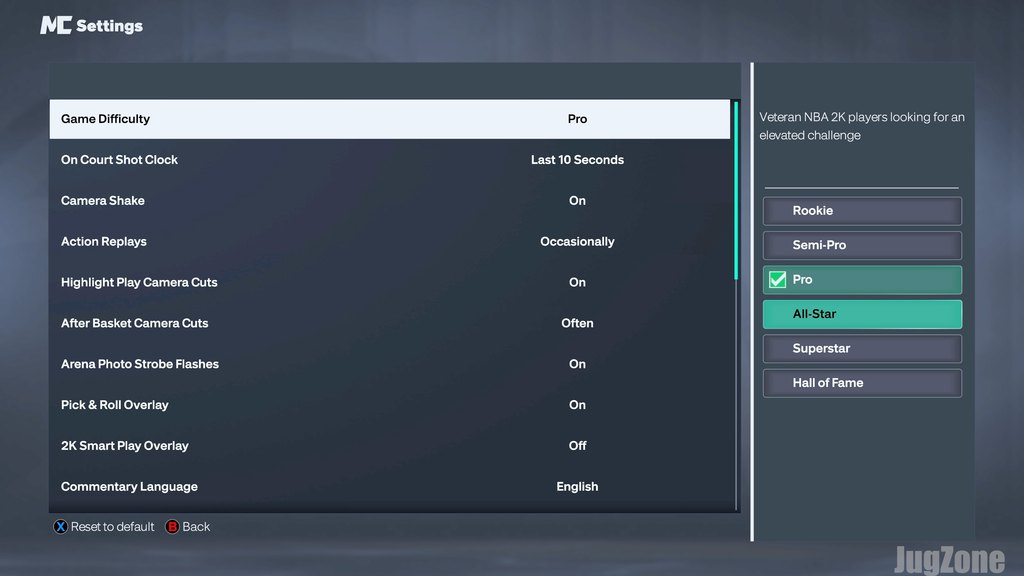
NBA 2K27 MyCAREER difficulty levels explained
MyCAREER gives you six difficulty options, starting with Rookie and ending with Hall of Fame. Here is how I would approach each one while learning the game and improving a build:
| Difficulty | Suggested use |
|---|---|
| Rookie | Recommended for players who are new to NBA 2K |
| Semi-Pro | Some precious NBA 2K experience familiar with basic controls |
| Pro | Traditional default NBA 2K experience; presents a challenge |
| All-Star | Veteran NBA 2K players looking for an elevated challenge |
| Superstar | Serious NBA 2K player with years of experience and a deep understanding of the game |
| Hall of Fame | Players looking for the ultimate challenge and skill-based competitive play |
These are recommendations for choosing a setting. You can use the descriptions in your Settings menu to help decide which level fits your experience.
How difficulty affects VC and MyPOINTS
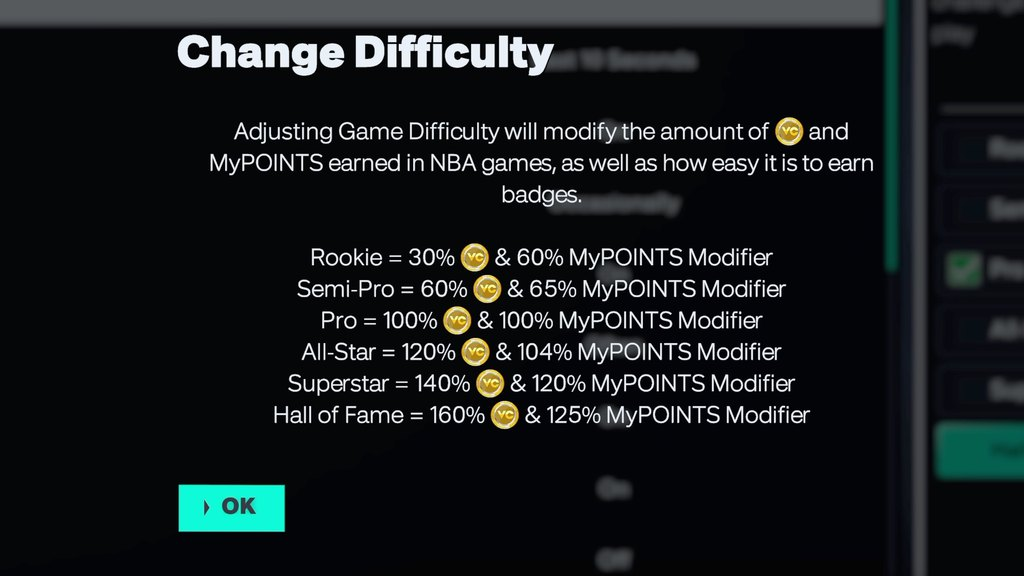
Higher difficulty settings offer larger difficulty-based reward modifiers for VC and MyPOINTS. Lower settings offer smaller modifiers.
That does not mean moving straight to Hall of Fame will automatically give you the best result. Your performance still matters. If the tougher setting causes your stats and teammate grade to fall, the larger modifier may not make up for that drop.
Think about the full game you can put together. A setting that lets you score efficiently, make useful plays, and finish with a good grade may be a better choice for progression than one where you struggle through every possession.
Check the reward information shown for your selected difficulty, then compare it with what you actually receive after playing.
What is the best difficulty for beginners?
Start on Pro and adjust from there. That gives you a place to learn your build, get used to your shooting motion, and work out how you want to play.
If Pro feels overwhelming, drop to Semi-Pro or Rookie while you practice. Once you can consistently put together good games, increase the difficulty by one level and see how your performance changes.
You do not have to jump straight from Pro to Hall of Fame. Try All-Star first, then consider Superstar when you are ready for another step up.
Can a lower difficulty help you earn MyPOINTS?
A lower difficulty can make it easier to complete the plays you are practicing. Steals, blocks, and alley-oops are examples from the video of plays you can work on while building your MyPOINTS totals.
The tradeoff is the smaller reward modifier. If you can complete useful plays much more consistently at a lower level, that may still work well while you learn. The best choice depends on how much your performance improves when you lower the setting.
Focus on plays that suit your build. A player built to protect the rim will approach a game differently from a guard learning to set up teammates. Work on the actions you can repeat successfully instead of forcing a highlight on every possession.
How to find the best difficulty for your player
Use a few games to compare settings:
- Play on your current difficulty. Note your teammate grade, main stats, VC, and MyPOINTS.
- Move up one level. Keep the quarter length and your playing time as similar as possible so the comparison is useful.
- Compare the results. Look at the actual rewards alongside how consistently you played well.
- Keep the setting that fits your goal. If the jump makes it hard to perform, return to the previous level and keep practicing.
The goal is to find the highest difficulty where you can still put together strong games. As your player improves and you learn the mechanics, revisit the setting.
Watch the video guide
What difficulty do you play on while learning a new build? Let me know in the comments.